Superimposition of Thermal Image and Real Image
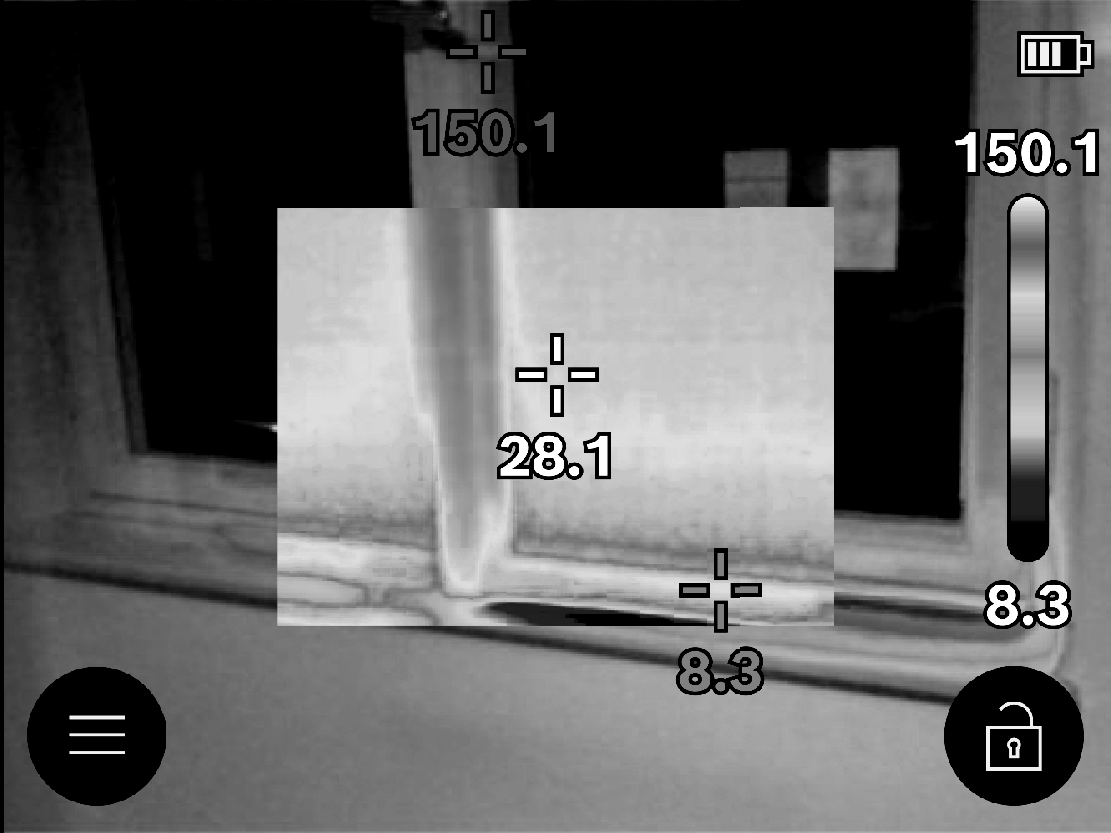
For improved orientation (= local assignment of the thermal image displayed), with matched temperature ranges, a real visual image can additionally be inserted.
Note: The superimposition of the real image and thermal image corresponds exactly at a distance of 1 m. If the tool is closer to or further away from the object being measured, this fundamentally results in misalignment of the real image and thermal image. This misalignment can be compensated for using special Bosch applications. Information about the applications and their compatibilities can be found on the product page of the measuring tool or at
www.bosch-professional.com or
www.bosch-professional.com/thermal.
The measuring tool offers the following options:
- Complete infrared image
Only the thermal image is displayed.  Transparency
The thermal image displayed is placed on top of the real image in such a way that it is transparent. This enables improved detection of objects.
To activate/deactivate the setting, open the left side bar and scroll to the <Visual image off>/<Visual image on> menu item. Confirm your selection by pressing the centre of the multi-function button (17). Image in image
The thermal image displayed is cropped and the surrounding area is shown as a real image. This setting improves the local assignment of the measuring range.
To activate/deactivate the setting, open the left side bar and scroll to the <Pic-in-pic on>/<Pic-in-pic off> menu item. Confirm your selection by pressing the centre of the multi-function button (17).